Skip Navigation or Skip to Content
7. May 2026

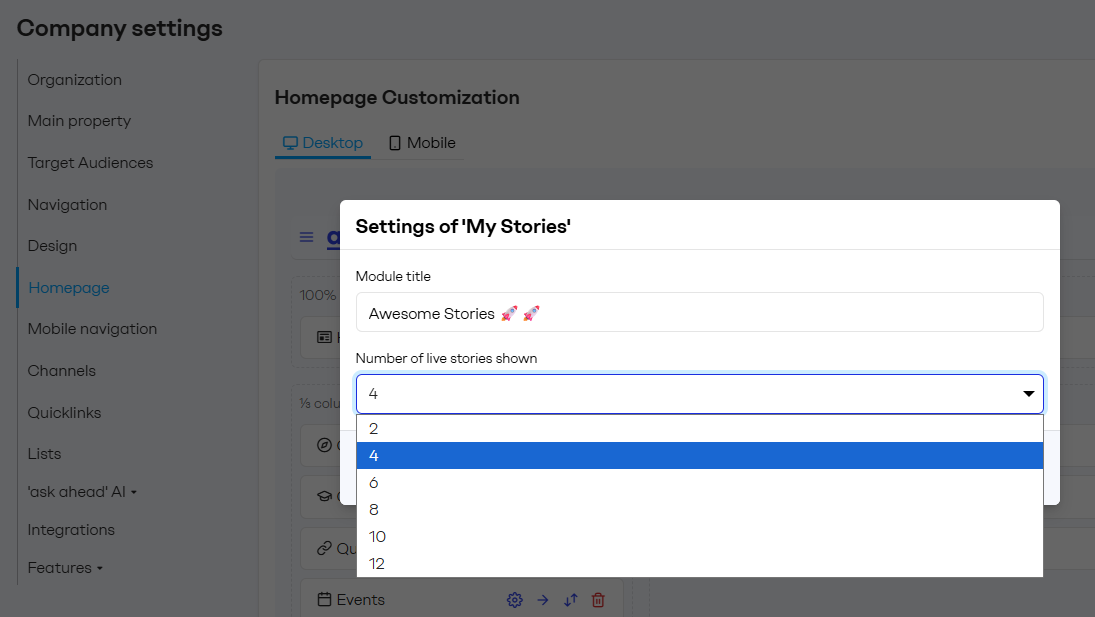
Choose how many Stories show on the Homepage

Admins can now set how many live Stories the Stories module displays on the Homepage, with options ranging between 2 and 12. Previously the module always showed up to 6, and any additional live Stories weren't visible.

Choose how many Stories show on the Homepage

Pick the count that fits your layout
In the Stories module settings, choose 2, 4, 6, 8, 10, or 12 live Stories to display. The module shows your most recently updated live Stories up to that count.

Tip: Set it to 4 to keep the Homepage compact or 12 when Stories are a central part of your internal comms.

More control over the Homepage balance
Every content type on the Homepage competes for space. Tuning the Stories count means you can give News, Events, Communities and other modules the right amount of room.

Back

We always enjoy talking to you

Let's talk

Chat_messages_royal

Send a message

Contact to arrange an appointment

Back

Send a message

Contact to arrange an appointment