

Until now, polls and quizzes only showed aggregate counts, so no one could tell who picked what, or who answered a quiz correctly. This new setting opens up new use cases while keeping full anonymity available whenever you want it.
Use a poll as an RSVP and see exactly who's coming
Three visibility levels
When creating a poll or quiz, you can choose:
-
Anonymous: only vote counts are shown. No one sees who voted for what, not even editors. This is exactly how polls and quizzes have behaved so far.
-
Visible to editors
new: everyone sees the counts, and editors of the page can additionally see who voted for each option (poll) or who answered correctly (quiz). -
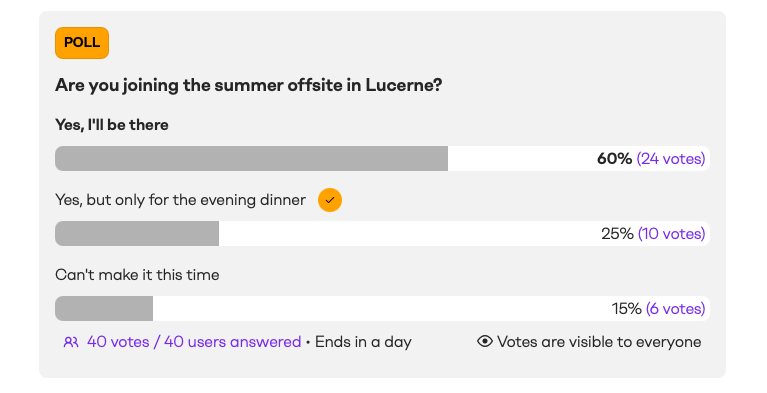
Public (new): everyone sees the counts and who voted for what, once they have voted themselves or the poll/quiz has ended.
See who voted and export it
On the levels that allow it, you can open a Votes detail view to see who voted. For polls, it lists voters per option. For quizzes, it splits them into answered correctly and did not answer correctly. From there, editors can export the full list to Excel.
 Celebrate the colleagues who got a quiz right
Get inspired: when to use each setting
Polls
-
Anonymous: a quick pulse check, "How clear was today's strategy update?", where honest answers depend on no one being identifiable.
-
Visible to editors: a merchandise sizing poll, "Which T-shirt size do you need?", where only the editor organising the order needs the individual answers.
-
Public: an RSVP-style poll on an event page, "Are you joining the summer offsite?", so the whole team can see who is coming.
Quizzes
-
Anonymous: an end-of-lesson knowledge check where learners can test themselves without their score being visible to anyone.
-
Visible to editors: a mandatory compliance quiz after a policy update, where the trainer needs to see individually who got it wrong, so they can follow up one to one.
-
Public: a festive trivia quiz, where seeing who guessed right is part of the fun.
Try the new visibility levels and discover useful and engaging ways to use polls and quizzes across your organisation.


