

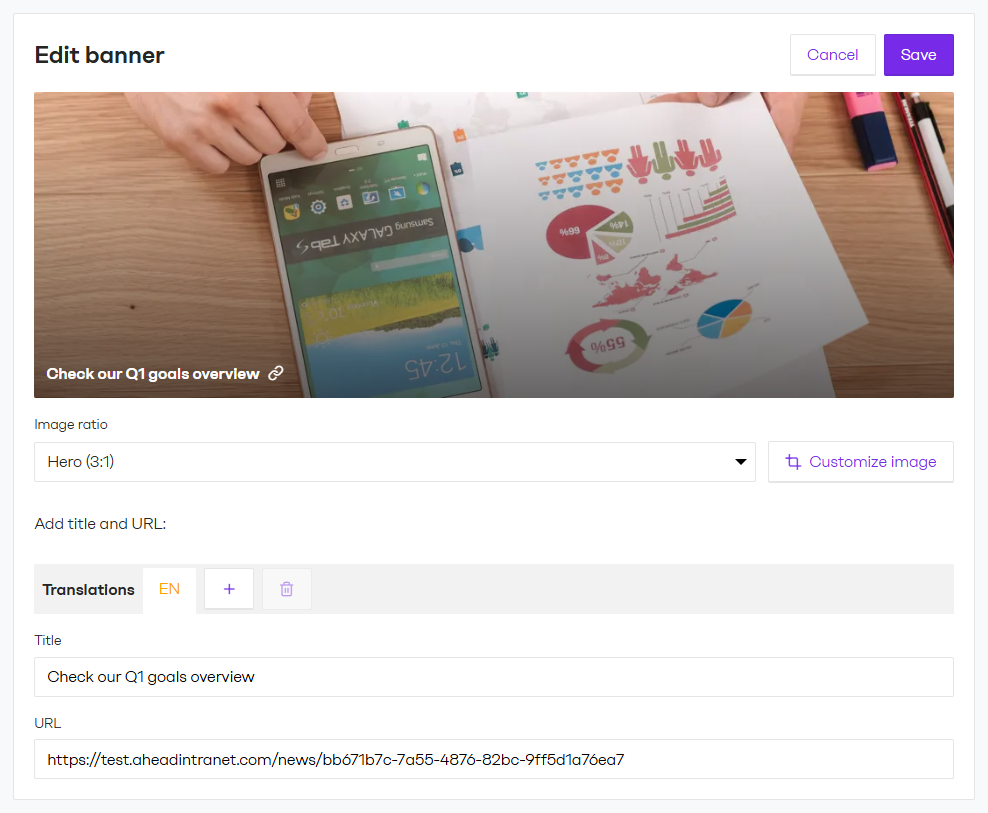
Admins can now add image-based Banners anywhere on the Homepage, Hubs or Courses. Unlike content-driven modules, a Banner is a pure visual element — you bring the image, choose the layout and optionally add a title or link. The result is a high-visibility block that works for promotions, campaigns, event announcements or simply guiding users to key areas of your intranet.
Use cases
📣Promote a campaign or initiative: Highlight a company-wide launch, open enrollment period or internal initiative with a striking visual linked directly to the relevant page.
🧭Guide users to key areas: Add a navigational banner that links to a frequently accessed Hub, page or document, like onboarding, IT support or the employee handbook, and reduce the friction of finding it.
🎨Set the tone for a Hub: Use an image at the top of a team or department Hub to give it visual identity. No link required, just the right atmosphere.
Key details
- Placement: Homepage, Hubs and Courses. Available in both 1/3 and 2/3 column layouts.
- Multiple banners: Add as many banners as needed per page. Stack seasonal promos or feature several hubs at once.
- Image & crop: Upload any image, pick a focal point and choose from a variety of aspect ratios.
- Text overlay: Optional title with translation support.
Banners are one of the fastest ways to make your intranet feel alive and current. Give them a try! Even a single well-placed image can meaningfully change how users experience your Homepage or Hubs.


